Follow an order from the customer’s phone to your sales report.
1
Customer orders
Phone
2
Store Orders · nowNew order · ₱435Pickup · 3 items
Staff gets an alert
Android
3
Cashier confirms
Dashboard
4
New
Prep
Ready
Kitchen prepares
Kitchen display
5
Owner sees sales
Reports
Everything included
CustomersCounterKitchenOwnerAlerts & platform
Online menuFast on any phone
Search & add-onsSizes, sugar, extras
Cart & checkoutNo account needed
Map pin deliveryPin sets the distance
Dine-in · Pickup · DeliveryPlus takeout
Pickup schedulingCustomers choose a time
Order tracking & My OrdersSaved on their phone
English & 中文 menuLanguage switch
Order dashboardEvery channel in one queue
Payment proof checkVerified before cooking
POSCash, GCash, Maya, bank
SC/PWD & promo discounts20% with ID, promo % or ₱
80 mm receipt printingCustomer copy with discounts
Kitchen displayNew → Preparing → Ready
Menu & inventorySold-out in one tap
Store profile & hoursPromos, tables, delivery area
Staff rolesAdmin, cashier, kitchen
Sales reportsShift, X-reading, cash drawer
Android order alarmRings even when locked
Cloud & securityServer-checked prices, safe data
Live project showcase
A real system, already running
Real screens from the running system: storefront, checkout, POS, and admin. Names, orders, and totals are test data. Tap any screenshot to see it full size.
yourrestaurant.com
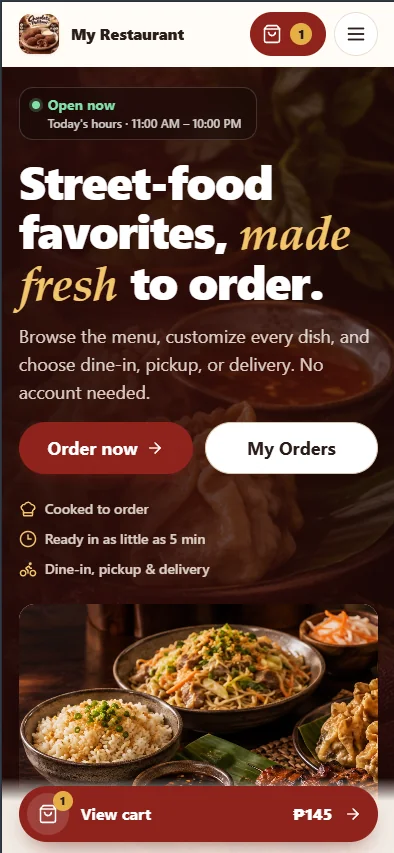
Real screenshot
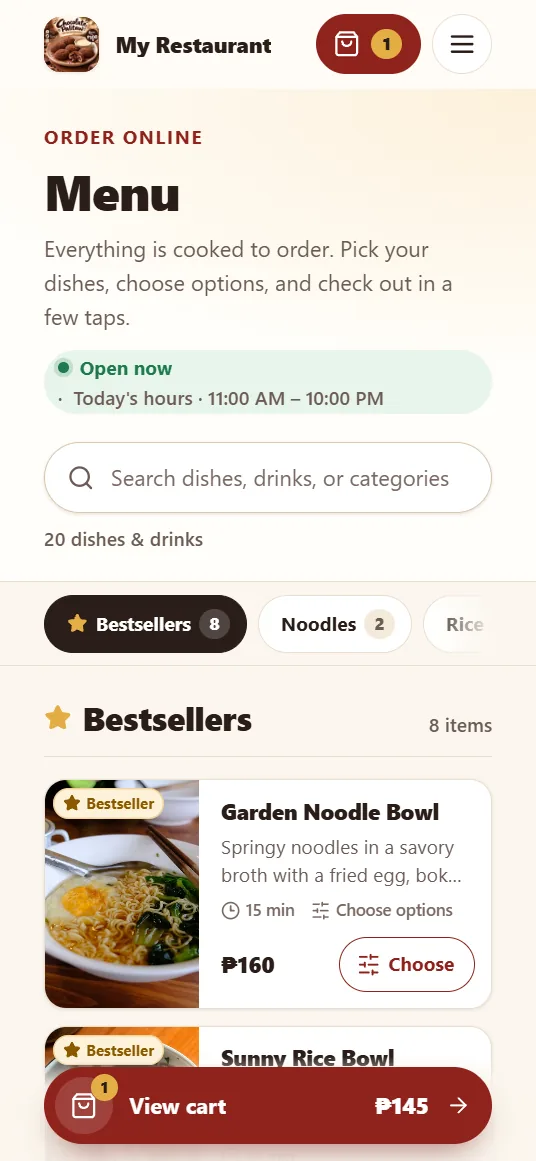
Customer storefront
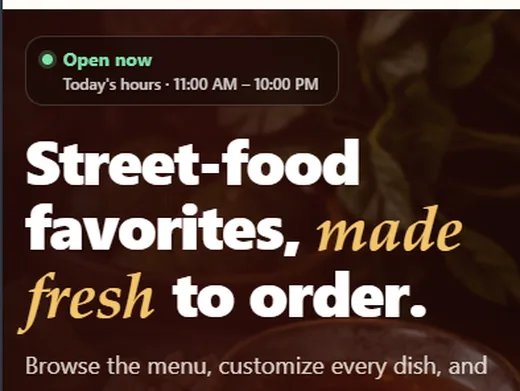
Your branded homepage and menu. Open hours update on their own, bestsellers sit up front, and the cart follows customers on mobile.
Open-now status from your store hours
Bestseller section and category chips
No account needed to order
yourrestaurant.com/menu
Real screenshot
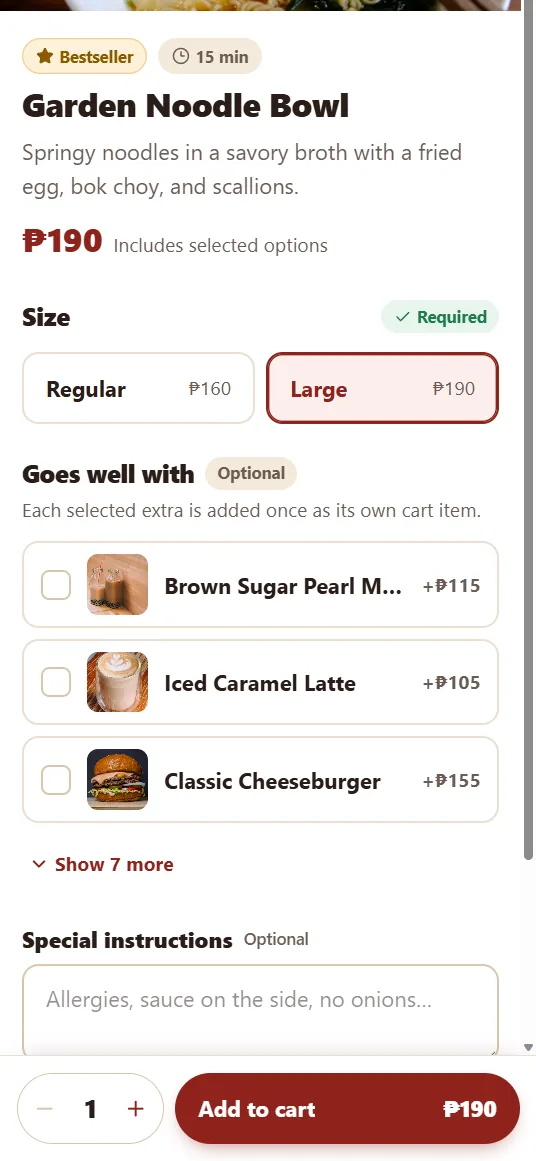
Menu with options and add-ons
Customers pick sizes, add drinks or sides, and leave special instructions. The price updates as they choose.
Required and optional choices
Suggested add-ons with photos
Special instructions per item
Real screenshot
Three-step mobile checkout
Order type, details, then payment and review. Each order type explains how payment works, so customers know what to expect.
Dine-in, takeout, pickup, or delivery
Order summary always visible
Pay at the cashier or online with screenshot upload
yourrestaurant.com/checkout
Real screenshot
Pin the exact delivery spot
Customers move the map or drag the pin to their gate, then complete the barangay and house details. Orders outside your delivery area are blocked.
Interactive map with draggable pin
Delivery area limited to your city
Pin sets the delivery distance and fee
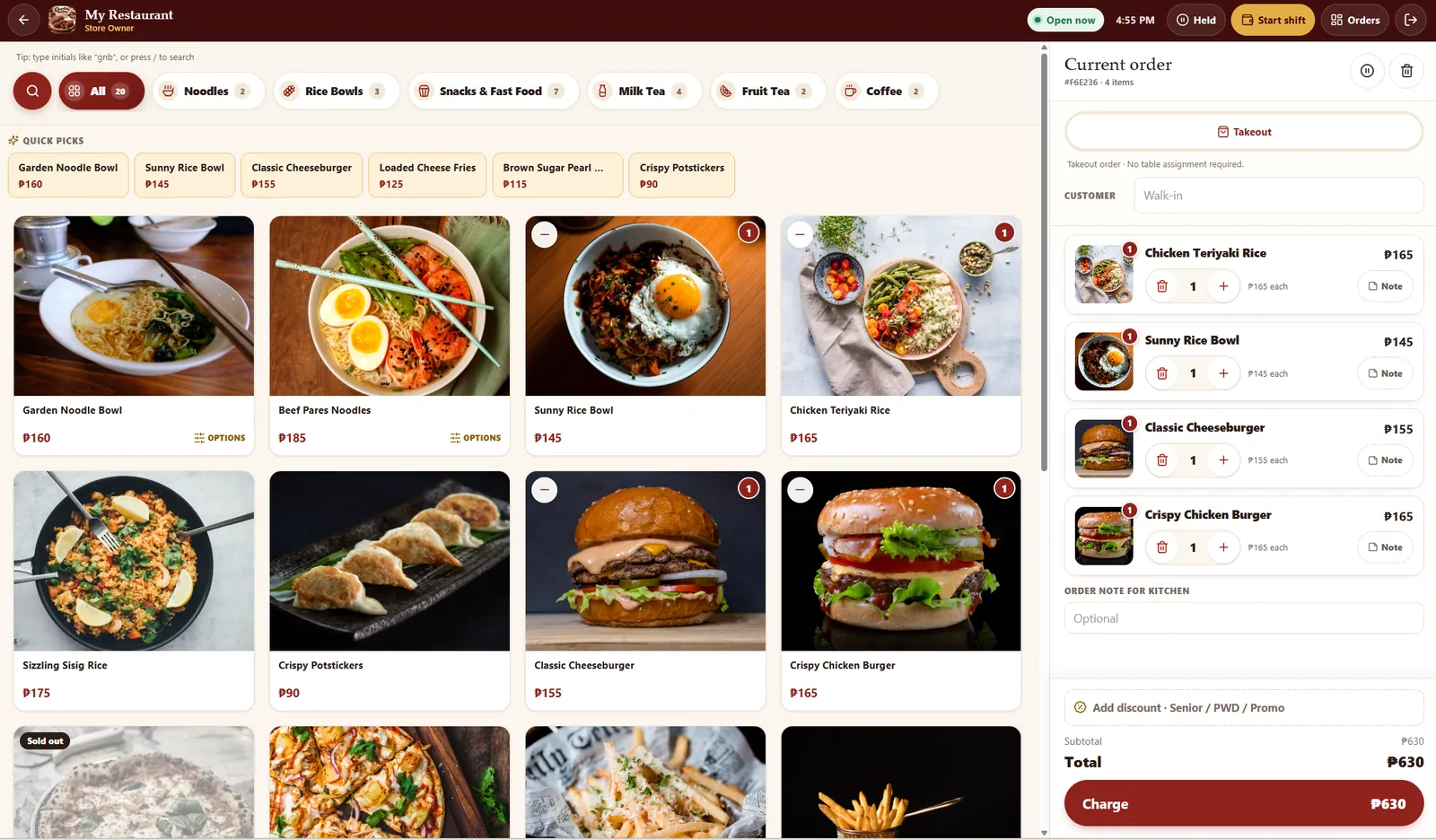
yourrestaurant.com/staff/pos
Real screenshot
Point of sale
Tap products to build the order, add notes per item or for the kitchen, and assign dine-in tables.
Quick picks and initials search
Dine-in tables or takeout
Hold and resume orders
yourrestaurant.com/staff/pos
Real screenshot
Fast cash and e-wallet payment
Tap the bills the customer hands over and the change is computed. GCash, Maya, and bank show the store's QR.
Peso bill and coin buttons
Exact amount in one tap
Send to kitchen right away
yourrestaurant.com/staff/pos
Real screenshot
Senior, PWD, and promo discounts
Built for Philippine rules: ID number and name on record, optional 12% VAT exemption, and discounts on the whole order or selected items.
Senior citizen and PWD 20%
Promo by percent or peso amount
Server re-checks every discount
Kitchen display12:46 PM · 4 tickets
New2
#0009DINE-IN · T4
received 1 min ago
2× Sizzling Sisig Rice
1× Loaded Cheese Fries
Start preparing
#0010PICKUP
received just now
1× Classic CheeseburgerNo pickles
Start preparing
Preparing1
#0007DELIVERY
6 min in prep
1× Beef Pares Noodles
2× Brown Sugar Milk TeaLess sugar · Extra pearls
Mark ready
Ready1
#0006TAKEOUT
ready 2 min ago
3× Crispy Potstickers
Complete
Interface preview
Kitchen display
Confirmed orders appear as tickets. The kitchen moves each one from New to Preparing to Ready, and customers see the same status on their tracking page.
Items, add-ons, and notes on every ticket
Works on any tablet or wall screen
Kitchen-only staff access
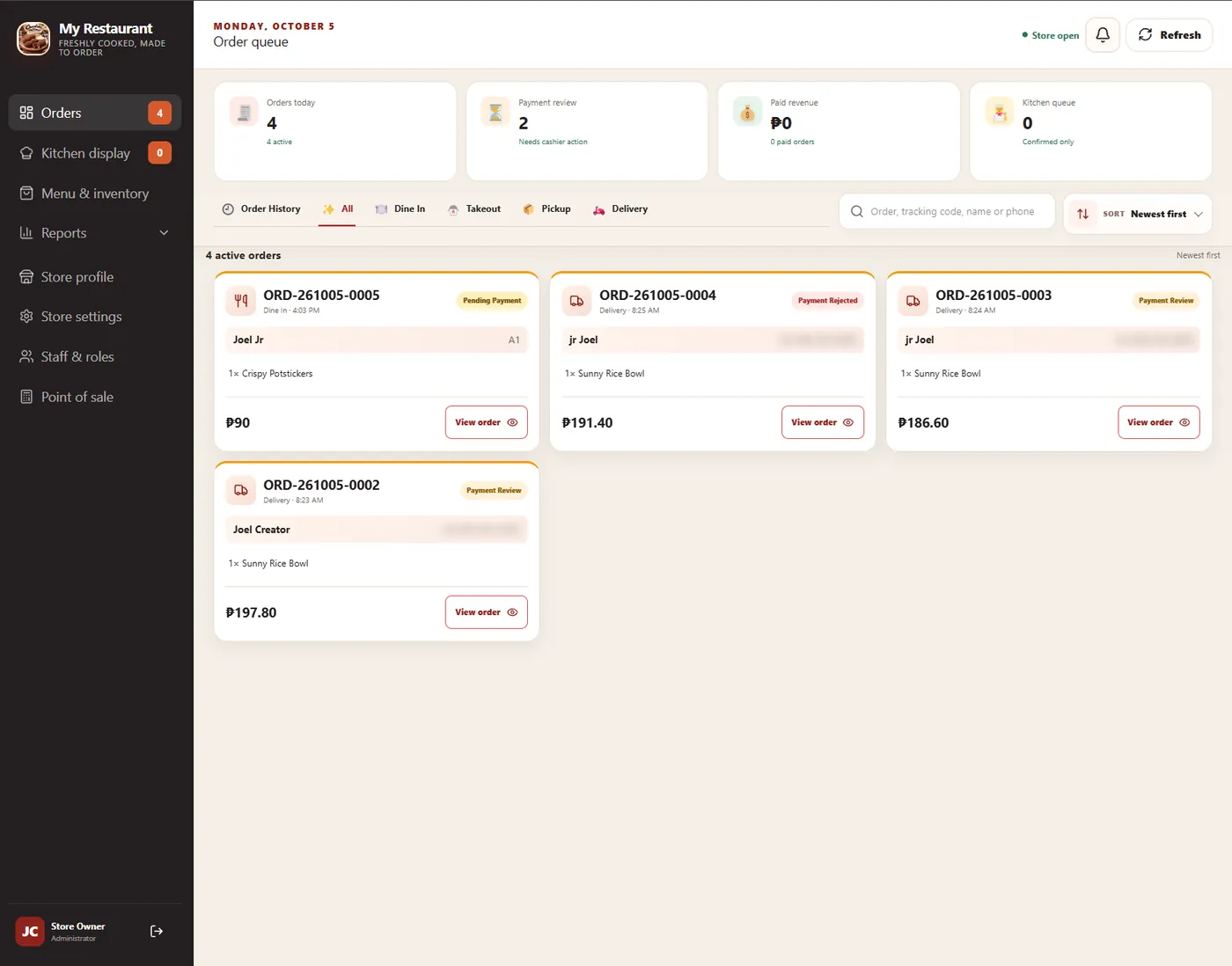
yourrestaurant.com/staff/dashboard
Real screenshot
Staff order dashboard
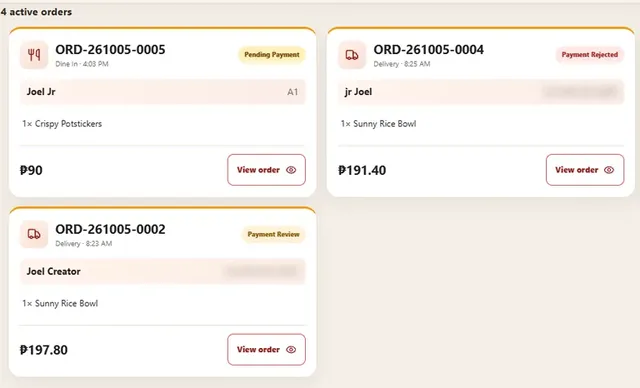
Every order in one queue with payment status at a glance. Filter by order type, search, and open any order.
Pending, review, and rejected payments
Dine-in, takeout, pickup, delivery tabs
Order history and search
yourrestaurant.com/staff/dashboard
Real screenshot
Menu & inventory
Add products, set prices, and switch an item to sold out in one tap. The customer menu updates right away.
Available, sold-out, and low-stock counts
Categories and bestseller picks
Optional stock tracking
yourrestaurant.com/staff/dashboard
Real screenshot
Delivery pricing you control
Set a starting fee, price per kilometer, maximum distance, and a free-delivery threshold. Hours, tables, notifications, and backups live here too.
Distance-based delivery fee
Free delivery above an amount
Messenger and social links
yourrestaurant.com/staff/dashboard
Real screenshot
Shift and cash drawer audit
Opening float, cash in and out, expected cash, and variance per shift, with a timeline of every POS action.
X-reading per shift
Flags drawer issues to review
Export CSV or save as PDF
yourrestaurant.com/staff/dashboard
Real screenshot
Sales reports
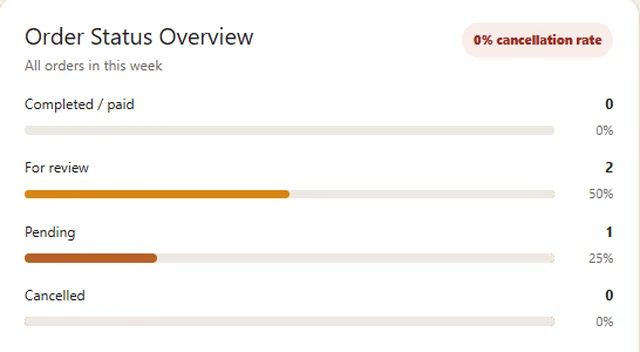
Reports count only paid, staff-verified orders, so the numbers match your cash and e-wallet records.
Gross sales, discounts, delivery fees, net
Order type and payment breakdowns
Daily, weekly, monthly trends
yourrestaurant.com/admin/staff
Real screenshot
Staff, roles & alerts
Give each person the access they need. Cashiers handle payments, the kitchen sees tickets, and the owner sees everything. New orders ring on staff Android phones.
12:41
Monday, October 5
Store Orders · now
New order ORD-0006 · ₱435Pickup · Maria · 3 items
OpenConfirm
Store Orders · 4m
Payment submitted for reviewDelivery · ORD-0005
Want to try it yourself? We’ll walk you through the live demo store, from placing an order to watching it reach the kitchen.
Not sure which fits? Tell us how your store works and we’ll recommend one. Walang pressure.
FAQ
Questions owners ask us
Don’t see yours? Send it with your demo request and we’ll answer it directly.
Can I use my own domain?
Yes. Your ordering site can run on your own domain, like yourrestaurant.com. If you don’t have one yet, we’ll help you choose and connect it. The domain is registered in your name.
Can customers order using a phone?
Yes. The site is designed for phones first. Customers open your link from Facebook, a QR code, or a bookmark and order in the browser. No app download or account needed.
Can I update products and prices myself?
Yes. From the admin panel you can add products, change prices and photos, set add-ons, mark items sold out, and manage stock. Changes show on the customer menu right away.
Does it support dine-in, pickup, and delivery?
Yes: dine-in with table numbers, pickup, takeout, and delivery with a map pin. You choose which order types to offer, and you can turn them on or off anytime.
Can it work with an Android staff notification app?
Yes. The JWeb staff alarm app for Android rings like an alarm for every new online order, even when the phone is locked, and opens the order in one tap. The staff dashboard can also be installed as a web app on tablets and phones.
Is hosting and maintenance included?
It depends on the package. Your quotation lists exactly what’s covered: setup, hosting, database, domain connection, and the maintenance plan, so there are no surprises later.
Can features be customized for my business?
Yes. The system is ours to build on, so we can adjust workflows, add fields, or develop new features for your store. Tell us what you need during the consultation.
Do I have to leave the delivery apps?
No. Many businesses keep the apps for reach and use their own site for regulars, dine-in, and pickup. JWeb Works works fine alongside them.
Free demo
Let’s get your store online. Tara, usap tayo.
Request a free demo and we’ll show you the system running, using a store like yours. No commitment.
A walkthrough of ordering, POS, kitchen, and reports
A package recommendation based on how you operate
A clear quotation with setup, hosting, and maintenance